
Element
Anything that can be drawn, such as a shape, a group of elements, a bitmap, an SVG picture or nothing at all.
Every element is immutable and carries one affine, which places its local geometry in the world, and an anchor, a local point that the affine carries along. Every transform composes into the affine and is defined once, here:
rotateBy,scaleByandscaleToturn and scale around the anchor, and the flips mirror along the world axes through it, so an asymmetric shape spins in place and two rotations equal one combined rotation.moveToputs the anchor at a point, andwithAnchormoves the anchor without moving anything drawn.rotateAroundandscaleAroundturn and scale around a pivot given for that one call.
By default the anchor is the middle of the element's local, untransformed geometry, so an unrotated element starts with its anchor in the middle of its bounds.
A zero scale factor or a zero target size leaves nothing to draw and gives the empty picture. Amounts that are not finite numbers are refused with an IllegalArgumentException.
import smile.colors.PresetColor.*

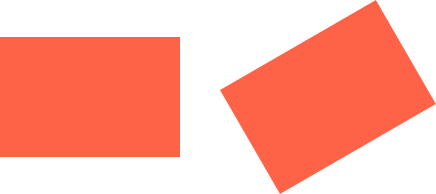
val flag   = Rectangle(90, 60, fillWith(Tomato), None)
val turned = flag.rotateBy(30)
val both   = flag.addToRight(turned, gap = 20)
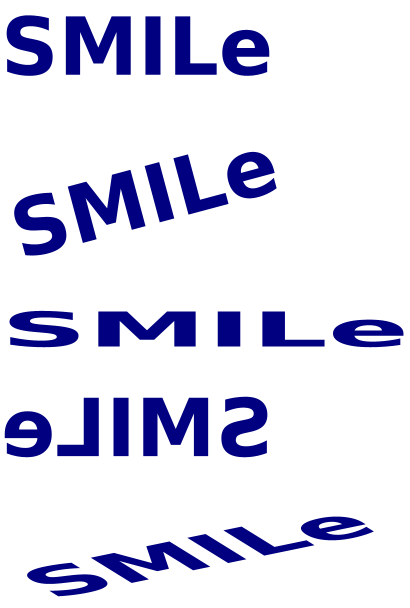
The same transforms on a text, whose letters show which way each one goes. An uneven scaling after a turn slants it.
import smile.colors.PresetColor.*
import smile.modeling.*

val word     = Text(Pos.Origin, None, "SMILe", "sans-serif", 40, 700, fillWith(Navy), None)
val tilted   = word.rotateBy(15)
val wide     = word.scaleBy(1.5, 0.6)
val mirrored = word.flipHorizontally
val slanted  = word.rotateBy(30).scaleBy(1.4, 0.5)
val versions = Seq(word, tilted, wide, mirrored, slanted)
val showcase = versions.reduce((column, next) => column.addToBottom(next, gap = 12))
Composing elements with addToRight, addToFront, replicateTo and the rest gives one picture anchored at the middle of its bounds. The empty picture is the identity. Adding it changes nothing, and no gap is laid out next to it.
Elements are equal when they draw the same geometry in the same style through the same affine with the same anchor. Affines and anchors are normalized when they are made (see smile.modeling.Affine), so a quarter turn and back gives exactly the element it started as. Bitmaps are the exception. They are equal only with the same source, and their own transforms record steps on a new source. Turns that add up to none give back the source from before them, so a turn and back is exact there too, but a scaling and back, or a flip and back, is not.
Attributes
- Source
- Element.scala
- Graph
-
- Supertypes
- Known subtypes
Members list
Grouped members
Turning and flipping
This element mirrored both ways through its anchor, which is a half turn around it.
This element mirrored both ways through its anchor, which is a half turn around it.
Attributes
- Source
- Element.scala
This element mirrored left to right across the vertical line through its anchor.
This element mirrored left to right across the vertical line through its anchor.
Attributes
- Source
- Element.scala
This element mirrored top to bottom across the horizontal line through its anchor.
This element mirrored top to bottom across the horizontal line through its anchor.
Attributes
- Source
- Element.scala
This element turned by degrees around pivot, counterclockwise on screen for a positive angle. Right angles are exact.
This element turned by degrees around pivot, counterclockwise on screen for a positive angle. Right angles are exact.
import smile.colors.PresetColor.*
import smile.modeling.*

val hand = Rectangle(60, 8, fillWith(Navy), None)
val fan  = Picture((0 to 150 by 30).map(angle => hand.rotateAround(angle, Pos(-30, 0)))*)

Attributes
- Throws
-
IllegalArgumentException
if the angle or a coordinate of
pivotis not finite - Source
- Element.scala
This element turned by degrees around its anchor, counterclockwise on screen for a positive angle. Right angles are exact.
This element turned by degrees around its anchor, counterclockwise on screen for a positive angle. Right angles are exact.
Attributes
- Throws
-
IllegalArgumentException
if the angle is not finite
- Source
- Element.scala
Scaling
This element scaled by factor around pivot. A negative factor also mirrors it, and a zero factor gives the empty picture.
This element scaled by factor around pivot. A negative factor also mirrors it, and a zero factor gives the empty picture.
Attributes
- Throws
-
IllegalArgumentException
if the factor or a coordinate of
pivotis not finite, or the scaled element would be too large for its transform to hold in aDouble - Source
- Element.scala
This element scaled by horizontal along the world's x axis and vertical along its y axis, around pivot. A negative factor also mirrors it on that axis, and a zero factor gives the empty picture.
This element scaled by horizontal along the world's x axis and vertical along its y axis, around pivot. A negative factor also mirrors it on that axis, and a zero factor gives the empty picture.
Attributes
- Throws
-
IllegalArgumentException
if a factor or a coordinate of
pivotis not finite, or the scaled element would be too large for its transform to hold in aDouble - Source
- Element.scala
This element scaled by factor around its anchor. A negative factor also mirrors it, and a zero factor gives the empty picture.
This element scaled by factor around its anchor. A negative factor also mirrors it, and a zero factor gives the empty picture.
Attributes
- Throws
-
IllegalArgumentException
if the factor is not finite
- Source
- Element.scala
This element scaled by horizontal along the world's x axis and vertical along its y axis, around its anchor. A negative factor also mirrors it on that axis, and a zero factor gives the empty picture.
This element scaled by horizontal along the world's x axis and vertical along its y axis, around its anchor. A negative factor also mirrors it on that axis, and a zero factor gives the empty picture.
import smile.colors.PresetColor.*
import smile.modeling.*

val coin      = Circle(Pos.Origin, 30, fillWith(Gold), lineWith(Black, 4, round = true))
val stretched = coin.scaleBy(2, 0.5)


Attributes
- Throws
-
IllegalArgumentException
if a factor is not finite
- Source
- Element.scala
This element scaled around its anchor along the world axes so that its bounds are width wide and height high, outlines included, since they scale with the shape.
This element scaled around its anchor along the world axes so that its bounds are width wide and height high, outlines included, since they scale with the shape.
A negative target flips the element on that axis first. A zero target gives the empty picture. An axis on which the element has no extent, such as the width of an empty text, is left as it is.
Scaling along the world axes scales the bounds by exactly the same factors, so one step is enough, up to the rounding of the factors and of the arithmetic that places the bounds. That rounding has an absolute floor of about 2^-19 pixel, since the anchor and every move lie on the grid of 2^-20 pixel, so a target smaller than that is not met to its own precision.
Attributes
- Throws
-
IllegalArgumentException
if a target is not finite, or the target is so much larger than the current extent that the factor between them, or the scaled transform, overflows a
Double - Source
- Element.scala
Value members
This element with content added in front of it, moved so that the point of its bounds that positionType names is at (x, y). That point is the middle of its bounds by default, or their upper left corner.
This element with content added in front of it, moved so that the point of its bounds that positionType names is at (x, y). That point is the middle of its bounds by default, or their upper left corner.
Attributes
- Source
- Composition.scala
This element with content added on targetSide, gap pixels away and aligned along that side by align, in front of this element.
This element with content added on targetSide, gap pixels away and aligned along that side by align, in front of this element.
import smile.colors.PresetColor.*
import smile.modeling.*

val square = Rectangle(60, fillWith(Teal), None)
val pair   = square.addToRight(Circle(Pos.Origin, 20, fillWith(Gold), None), gap = 10)

Attributes
- Source
- Composition.scala
This element with content behind it.
This element with content added below it, gap pixels away and aligned by align.
This element with content added below it, gap pixels away and aligned by align.
Attributes
- Source
- Composition.scala
This element with content in front of it.
This element with content in front of it.
import smile.colors.PresetColor.*
import smile.modeling.*

val disc   = Circle(Pos.Origin, 40, fillWith(Crimson), None)
val target = disc.addToFront(Circle(Pos.Origin, 20, fillWith(White), None))

Attributes
- Source
- Composition.scala
This element with content added to its left, gap pixels away and aligned by align.
This element with content added to its left, gap pixels away and aligned by align.
Attributes
- Source
- Composition.scala
This element with content added to its right, gap pixels away and aligned by align.
This element with content added to its right, gap pixels away and aligned by align.
Attributes
- Source
- Composition.scala
This element with content added above it, gap pixels away and aligned by align.
This element with content added above it, gap pixels away and aligned by align.
Attributes
- Source
- Composition.scala
alternateWith downwards.
alternateWith rightwards.
This element with numberOfAlternations elements added on side, one after another, each next to all before it. First come the alternatives in order, then this element, then the alternatives again, and so on.
This element with numberOfAlternations elements added on side, one after another, each next to all before it. First come the alternatives in order, then this element, then the alternatives again, and so on.
import smile.colors.PresetColor.*
import smile.modeling.*

val red   = Circle(Pos.Origin, 12, fillWith(Crimson), None)
val blue  = Circle(Pos.Origin, 12, fillWith(Navy), None)
val beads = red.alternateRightwardsWith(Seq(blue), 6, gap = 4)

Attributes
- Throws
-
IllegalArgumentException
if the number of alternations is negative
- Source
- Composition.scala
What this element draws within the world rectangle world, with world as its bounds even where nothing is drawn, and its anchor in the middle of world.
What this element draws within the world rectangle world, with world as its bounds even where nothing is drawn, and its anchor in the middle of world.
The rectangle stays a rectangle however this element is turned, and later transforms turn it with the content. A rectangle with no width or no height gives blank space of that size. A crop is always a clip, even of a rectangle that is exactly this element's bounds, so its anchor is always the middle of the rectangle.
When an earlier crop has only moved, scaled, turned by quarter turns or been mirrored, both crops share one clip. A crop on every tick, as a zoom makes, then stays one clip deep.
A crop of a turned element, or a turn of a crop, is cropped to the box around the turned rectangle, which is larger than the rectangle for an angle that is not a quarter turn. A square's side grows by abs(cos a) + abs(sin a) per turn by a. Crop back to a fixed window after each step of a fold to keep its bounds from growing.
import smile.colors.PresetColor.*
import smile.modeling.*

val star = Star5(40, 16, Pos.Origin, fillWith(Gold), None)
val half = star.crop(Bounds(Pos(-40, -40), Pos(0, 40)))

Attributes
- Throws
-
IllegalArgumentException
if a corner of
worldis not finite - Source
- Clipping.scala
content placed onto this element as addAt adds it, and the result cropped to this element's bounds as crop crops it, so nothing reaches outside this background.
content placed onto this element as addAt adds it, and the result cropped to this element's bounds as crop crops it, so nothing reaches outside this background.
Placing the empty picture gives this element unchanged, and placing anything onto the empty picture gives the empty picture, since its lack of bounds clips everything away.
Successive placements share one crop when the intervening transform preserves the axes. Placing once per animation tick then keeps the crop depth constant.
A background turned by an angle that is not a quarter turn has bounds that are the box around the turned rectangle, and a place crops to that box. Turning the result again takes the box around that box, so a fold that places and then turns grows without bound. For a square background turned by a, the side grows by abs(cos a) + abs(sin a) per step, about 1.08 at 5 degrees. To avoid it, crop back to a fixed window after each step.
Attributes
- Source
- Composition.scala
replicateTo downwards.
replicateTo rightwards.
This element with numberOfReplicas copies added on side, one after another, each next to all before it. Each copy is transformer applied to the copy before it, the first to this element.
This element with numberOfReplicas copies added on side, one after another, each next to all before it. Each copy is transformer applied to the copy before it, the first to this element.
import smile.colors.PresetColor.*
import smile.modeling.*

val dot = Circle(Pos.Origin, 20, fillWith(SteelBlue), None)
val row = dot.replicateRightwards(4, gap = 8)

Attributes
- Throws
-
IllegalArgumentException
if the number of replicas is negative
- Source
- Composition.scala
This element's pixels, frozen into a bitmap. They are rendered at once with settings at scale buffer pixels per logical pixel, as smile.infrastructure.Renderer.createBitmapFrom renders them. The bitmap covers the whole pixels the element's bounds touch, and its anchor is where the element's anchor is.
This element's pixels, frozen into a bitmap. They are rendered at once with settings at scale buffer pixels per logical pixel, as smile.infrastructure.Renderer.createBitmapFrom renders them. The bitmap covers the whole pixels the element's bounds touch, and its anchor is where the element's anchor is.
Pixel reads stay at one buffer pixel per logical pixel by default. A larger scale is for display on a dense screen, and its bitmap's buffer is that much denser than its bounds. A bitmap of pixels that only its own operations have placed is frozen already, and at the default scale it is its own bitmap. A bitmap of a picture is rendered with settings.
Something that covers no whole pixel, such as the empty picture or blank space with no width, gives a bitmap with no bounds whose pixels are one transparent pixel, since neither a Java image nor a canvas's pixel data can have none.
Attributes
- Throws
-
IllegalArgumentException
if
scaleis not positive and finite, or is not 1 for aStepwiserendering - Source
- Rasters.scala
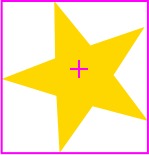
This element with guides for debugging. Its bounds are outlined and its anchor is marked by a small cross, both in magenta and in front of it. The result is anchored where this element is.
This element with guides for debugging. Its bounds are outlined and its anchor is marked by a small cross, both in magenta and in front of it. The result is anchored where this element is.
import smile.colors.PresetColor.*
import smile.modeling.*

val guided = Star5(40, 16, Pos.Origin, fillWith(Gold), None).rotateBy(20).withGuides
Attributes
- Source
- Clipping.scala
This element moved by dx to the right and dy down within its bounds, so that what leaves one edge comes back at the opposite one. The bounds and the anchor stay where they are, and a shift by the whole width or height gives this element back.
This element moved by dx to the right and dy down within its bounds, so that what leaves one edge comes back at the opposite one. The bounds and the anchor stay where they are, and a shift by the whole width or height gives this element back.
Shifting a shifted element that has only been moved, turned by quarter turns or mirrored since, adds to its shift. So does shifting a crop of a shift, where both have only been moved since and the crop is the shift's own rectangle. Either way, any number of shifts costs the same as one. After other transforms, a shift wraps the transformed element within its new bounds. Those bounds are the box around a turned element, so shifting and then turning by an angle that is not a quarter turn grows a square's side by abs(cos a) + abs(sin a) per step, as place does.
import smile.colors.PresetColor.*
import smile.modeling.*

val shape   = Star5(40, 16, Pos.Origin, fillWith(Gold), None)
val wrapped = shape.wrapShift(40, 0)

Attributes
- Throws
-
IllegalArgumentException
if an offset is not finite
- Source
- Clipping.scala