
smile.pictures.StrokeStyle
See theStrokeStyle companion object
How an outline is stroked, given by its paint, its line width, and its cap and join styles.
import smile.colors.PresetColor.*

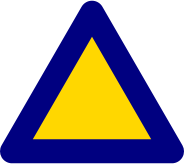
val thick    = StrokeStyle(Navy, 12, StrokeStyle.Cap.Round, StrokeStyle.Join.Round)
val outlined = Triangle(80, fillWith(Gold), Some(thick))
Value parameters
- cap
-
The cap style of the stroke. Defaults to Square.
- join
-
The join style of the stroke. Defaults to Miter. A text's glyphs are stroked with round joins regardless. A stroke lives in its shape's own frame and scales with the shape, by each axis's own factor.
- paint
-
The single color or gradient used for the stroke.
- width
-
The width of the stroke, finite and not negative. Defaults to 1.
Attributes
- Throws
-
IllegalArgumentException
if the width is negative or not finite
- Companion
- object
- Source
- style.scala
- Graph
-
- Supertypes
Members list
In this article