
smile.pictures
Members list
Type members
An animation, which shows frames one after another, each for its delay in milliseconds, looping forever from startTime.
An animation, which shows frames one after another, each for its delay in milliseconds, looping forever from startTime.
The frame on display is a pure function of the clock. smile.pictures.AnimatedPicture.frameAt gives it for an instant, which makes it deterministic to test. The bounds are the union of every frame's, so a layout stays still while the animation runs. The anchor starts at the first frame's.
Equality covers the frames, their delays, the start time, the affine and the anchor, so equal animations show the same frame at every instant. A renderer draws the frame at the instant it is given (see smile.infrastructure.Renderer.createBitmapFrom).
Attributes
- Companion
- object
- Source
- Element.scala
- Supertypes
Builds and loads animations.
Builds and loads animations.
Attributes
- Companion
- class
- Source
- Element.scala
- Supertypes
- Self type
-
AnimatedPicture.type
Arcs of ellipses, and whole ellipses.
Arcs of ellipses, and whole ellipses.
import smile.colors.PresetColor.*
import smile.modeling.*

val arch = Arc(Pos.Origin, 120, 120, 0, 180, None, lineWith(Crimson, 8, round = true))
val bowl = Arc(Pos.Origin, 120, 80, 180, 180, fillWith(Gold), lineWith(Black, 2, round = true))

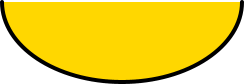
Attributes
- Source
- Shapes.scala
- Supertypes
- Self type
-
Arc.type
A raster image, which is pixels, or a picture rendered when its pixels are asked for, placed in the world by an affine.
A raster image, which is pixels, or a picture rendered when its pixels are asked for, placed in the world by an affine.
Its local frame is where its source lays its pixels, and its bounds are the box around those pixels under its affine. A bitmap turned by 45 degrees is as wide as its turned corners. The bitmap's own turns, flips and scalings, and its own crop and wrapShift, are also recorded as steps of its source, so that its pixels at one buffer pixel per logical pixel are the ones the buffer algorithms give, and a Stepwise output and a recoloring can replay them. Consecutive turns fold into one step by their total angle and crops into one crop, so a bitmap turned on every tick keeps one step. A transform no step can express, such as a scaling to less than a pixel, only composes into the affine, and so does a transform of a picture the bitmap is in.
Its anchor starts in the middle of its pixels. Its own crop is anchored in the middle of the crop, as a crop of any element is, and its flips and shifts keep its anchor. A crop that is not on whole pixels of the bitmap is the generic crop, a clip of the rectangle over the bitmap, and only a crop with no width or no height is blank space, as for any element.
Bitmaps are equal when they have the same source, the same affine and the same anchor, so two bitmaps of the same pixels made separately are not equal, and neither is a bitmap and the same bitmap scaled or flipped and back. Turns that add up to none give back the source from before them, so a bitmap turned and turned back is the bitmap it was.
smile.pictures.Bitmap$ builds bitmaps.
Attributes
- Companion
- object
- Source
- Element.scala
- Supertypes
Builds bitmaps. A bitmap of pixels is centered at the origin with its anchor there, in the middle of its pixels, and a bitmap of a picture covers the whole pixels the picture's bounds touch, anchored where the picture is.
Builds bitmaps. A bitmap of pixels is centered at the origin with its anchor there, in the middle of its pixels, and a bitmap of a picture covers the whole pixels the picture's bounds touch, anchored where the picture is.
Attributes
- Companion
- class
- Source
- Element.scala
- Supertypes
- Self type
-
Bitmap.type
Circles.
Circles.
import smile.colors.PresetColor.*
import smile.modeling.*
import smile.modeling.Pos
import smile.pictures.*

val circle = Circle(Pos.Origin, 40, fillWith(Orange), lineWith(Black, 4, round = true))
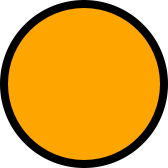
Attributes
- Source
- Shapes.scala
- Supertypes
- Self type
-
Circle.type
child seen only inside rect, a rectangle in the clip's own frame, so it turns with the clip. The child keeps its own affine. The clip's bounds are its rectangle under its affine, even where the child does not fill it, and its anchor starts in the middle of the rectangle.
child seen only inside rect, a rectangle in the clip's own frame, so it turns with the clip. The child keeps its own affine. The clip's bounds are its rectangle under its affine, even where the child does not fill it, and its anchor starts in the middle of the rectangle.
crop and blank in smile.pictures make clips. A blank clips the empty picture.
Attributes
- Source
- Element.scala
- Supertypes
Anything that can be drawn, such as a shape, a group of elements, a bitmap, an SVG picture or nothing at all.
Anything that can be drawn, such as a shape, a group of elements, a bitmap, an SVG picture or nothing at all.
Every element is immutable and carries one affine, which places its local geometry in the world, and an anchor, a local point that the affine carries along. Every transform composes into the affine and is defined once, here:
rotateBy,scaleByandscaleToturn and scale around the anchor, and the flips mirror along the world axes through it, so an asymmetric shape spins in place and two rotations equal one combined rotation.moveToputs the anchor at a point, andwithAnchormoves the anchor without moving anything drawn.rotateAroundandscaleAroundturn and scale around a pivot given for that one call.
By default the anchor is the middle of the element's local, untransformed geometry, so an unrotated element starts with its anchor in the middle of its bounds.
A zero scale factor or a zero target size leaves nothing to draw and gives the empty picture. Amounts that are not finite numbers are refused with an IllegalArgumentException.
import smile.colors.PresetColor.*

val flag   = Rectangle(90, 60, fillWith(Tomato), None)
val turned = flag.rotateBy(30)
val both   = flag.addToRight(turned, gap = 20)
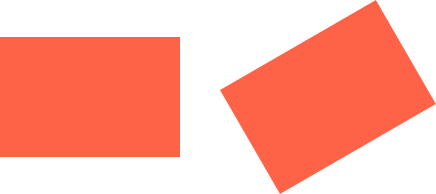
The same transforms on a text, whose letters show which way each one goes. An uneven scaling after a turn slants it.
import smile.colors.PresetColor.*
import smile.modeling.*

val word     = Text(Pos.Origin, None, "SMILe", "sans-serif", 40, 700, fillWith(Navy), None)
val tilted   = word.rotateBy(15)
val wide     = word.scaleBy(1.5, 0.6)
val mirrored = word.flipHorizontally
val slanted  = word.rotateBy(30).scaleBy(1.4, 0.5)
val versions = Seq(word, tilted, wide, mirrored, slanted)
val showcase = versions.reduce((column, next) => column.addToBottom(next, gap = 12))
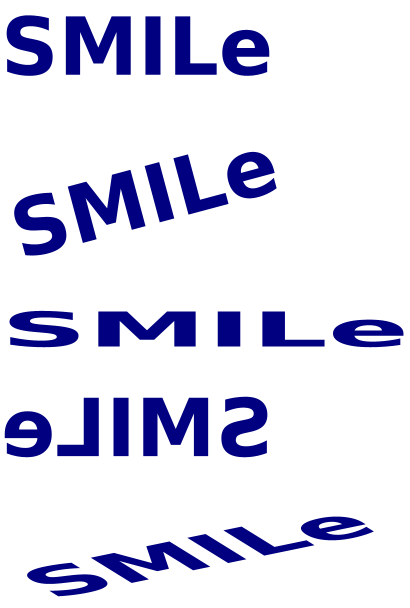
Composing elements with addToRight, addToFront, replicateTo and the rest gives one picture anchored at the middle of its bounds. The empty picture is the identity. Adding it changes nothing, and no gap is laid out next to it.
Elements are equal when they draw the same geometry in the same style through the same affine with the same anchor. Affines and anchors are normalized when they are made (see smile.modeling.Affine), so a quarter turn and back gives exactly the element it started as. Bitmaps are the exception. They are equal only with the same source, and their own transforms record steps on a new source. Turns that add up to none give back the source from before them, so a turn and back is exact there too, but a scaling and back, or a flip and back, is not.
Attributes
- Source
- Element.scala
- Supertypes
- Known subtypes
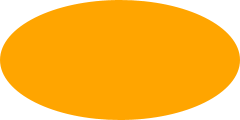
Ellipses with their axes along the x and y axes.
Ellipses with their axes along the x and y axes.
import smile.colors.PresetColor.*
import smile.modeling.*

val ellipse = Ellipse(Pos.Origin, 60, 30, fillWith(Orange), None)
Attributes
- Source
- Shapes.scala
- Supertypes
- Self type
-
Ellipse.type
The empty picture, with nothing drawn and no room taken. It has no bounds, it is 0x0, its anchor is the origin, and every transform of it and every new anchor for it is it. It is the identity for composition. Adding it to a picture, or a picture to it, gives that picture, and no gap is laid out next to it. A zero scale factor gives it too.
The empty picture, with nothing drawn and no room taken. It has no bounds, it is 0x0, its anchor is the origin, and every transform of it and every new anchor for it is it. It is the identity for composition. Adding it to a picture, or a picture to it, gives that picture, and no gap is laid out next to it. A zero scale factor gives it too.
Its bitmap (see smile.pictures.toBitmap) has no bounds either, but its pixels are one transparent pixel, since a buffer of pixels cannot have none.
Blank space that takes room is smile.pictures.blank.
Attributes
- Source
- Element.scala
- Supertypes
- Self type
-
Empty.type
How a shape is filled.
How a shape is filled.
Value parameters
- paint
-
The single color or gradient used for the fill.
Attributes
- Source
- style.scala
- Supertypes
Straight lines.
Straight lines.
import smile.colors.PresetColor.*
import smile.modeling.*

val line = Line(Pos(0, 40), Pos(120, 0), lineWith(Crimson, 8, round = true).get)

Attributes
- Source
- Shapes.scala
- Supertypes
- Self type
-
Line.type
Builds masks.
Builds masks.
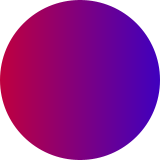
import smile.colors.LinearGradient
import smile.colors.PresetColor.*
import smile.modeling.*

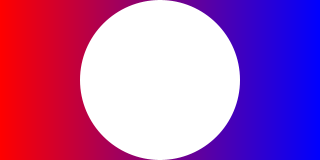
val gradient = LinearGradient(Pos(0, 0), Pos(160, 0), Red, Blue)
val stripe   = Rectangle(160, 80, fillWith(gradient), None)
val circle   = Circle(Pos.Origin, 40, fillWith(Black), None)
val masked   = MaskGroup(circle, stripe)
val pierced  = MaskGroup(circle, stripe, inverted = true)
Attributes
- Companion
- class
- Source
- Element.scala
- Supertypes
- Self type
-
MaskGroup.type
masked seen through masks, one after another in order. Each keeps what is left where it is opaque, or for an inverted mask, where it is not. Its bounds are the part of its last mask that is not inverted that lies within the masked content's bounds and those of its other masks that are not inverted, or with only inverted masks, the masked content's, since the content shows outside them. Its anchor starts at the masked content's.
masked seen through masks, one after another in order. Each keeps what is left where it is opaque, or for an inverted mask, where it is not. Its bounds are the part of its last mask that is not inverted that lies within the masked content's bounds and those of its other masks that are not inverted, or with only inverted masks, the masked content's, since the content shows outside them. Its anchor starts at the masked content's.
Attributes
- Companion
- object
- Source
- Element.scala
- Supertypes
Regular pentagons with a vertex straight up.
Regular pentagons with a vertex straight up.
import smile.colors.PresetColor.*
import smile.modeling.*

val pentagon = Pentagon(40, Pos.Origin, fillWith(Teal), None)

Attributes
- Source
- Shapes.scala
- Supertypes
- Self type
-
Pentagon.type
Builds pictures.
A group of elements, drawn front to back. The first child is in front of all the others.
A group of elements, drawn front to back. The first child is in front of all the others.
A picture is its own affine plus its children, so transforming it composes into that affine in constant time and keeps every child as it is. Its bounds are the union of its children's bounds through its affine. Its anchor is the middle of its content's bounds when it is built, carried by its later transforms.
smile.pictures.Picture.apply builds one, and the composition methods, such as addToRight, combine elements into one. A picture never holds the empty picture, and a picture of nothing but empty pictures is the empty picture itself.
Attributes
- Companion
- object
- Source
- Element.scala
- Supertypes
The pixels of a smile.pictures.Bitmap at one buffer pixel per logical pixel, as smile.pictures.Bitmap.pixels computed them. The view never changes. Nothing it gives can be written back into the bitmap or into the bitmaps that share its pixels.
The pixels of a smile.pictures.Bitmap at one buffer pixel per logical pixel, as smile.pictures.Bitmap.pixels computed them. The view never changes. Nothing it gives can be written back into the bitmap or into the bitmaps that share its pixels.
smile.pictures.Pixels.argbData is the fast path for reading many pixels. The other readers make a smile.colors.Color per pixel.
Attributes
- Source
- Pixels.scala
- Supertypes
Single points.
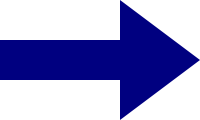
Polygons and polylines through any points.
Polygons and polylines through any points.
import smile.colors.PresetColor.*
import smile.modeling.*

val points =
 Seq(Pos(0, 20), Pos(60, 20), Pos(60, 0), Pos(100, 30), Pos(60, 60), Pos(60, 40), Pos(0, 40))
val arrow = Polygon(Pos.Origin, points, fillWith(Navy), None)
Attributes
- Source
- Shapes.scala
- Supertypes
- Self type
-
Polygon.type
Recolors a picture with a function on packed ARGB colors, as a bitmap's color operation does, while keeping the picture's shapes where the function lets it.
Recolors a picture with a function on packed ARGB colors, as a bitmap's color operation does, while keeping the picture's shapes where the function lets it.
The result's pixels are always exactly those of the picture rendered with the given settings and transformed pixel by pixel, which is what picture.toBitmap(settings).transformARGB(f, settings) gives, or for a bitmap that only its own operations have placed, its own pixels for the settings transformed, as bitmap.transformARGB(f, settings) gives. The function is called exactly as there, once for each pixel of that render, row by row, top row first.
Recoloring goes in four steps:
- Observe. While the function is called, a table of what it gave for each color is kept, along with whether it ever gave two answers for one color. A picture that is only a bitmap of pixels, holds an animation or covers no whole pixel falls back whatever the function gives, so for it no table is kept.
- Fall back. The result is a bitmap of the pixels alone when the function did that, when the picture paints with a color that no pixel showed it, when the table has more than 4096 colors, when the picture is only a bitmap of pixels, when it holds an animation, when it covers no whole pixel, or when the rebuilt picture would nest more than 8 pictures deep inside bitmaps of pictures. An SVG picture's document is not recolored, so a picture that shows one falls back too, at the verification below, whenever the function changes a color the document shows.
- Rebuild. Otherwise the picture is rebuilt with the colors of its fills, strokes, text, gradient stops and bitmap pixels replaced through the table. A mask lends only its opacity, so it stays as it is. When the function gave transparent pixels a visible color, a rectangle of that color goes behind the picture, on the pixels of its frame. The rebuilt picture is clipped to that frame, the whole pixels of the render.
- Verify. The rebuilt picture is rendered with the same settings. When its pixels are the observed ones, the result is a bitmap of the rebuilt picture whose checkpoint is the observed pixels for the settings, which an output with those settings takes and replays any later operation on. Any other output renders the rebuilt picture, a
Directone at its own scale. Otherwise the result is the bitmap of the pixels alone.
Attributes
- Source
- Recolor.scala
- Supertypes
- Self type
-
Recolor.type
Rectangles and squares.
Rectangles and squares.
import smile.colors.PresetColor.*

val rectangle = Rectangle(120, 60, fillWith(CornflowerBlue), None)

Attributes
- Source
- Shapes.scala
- Supertypes
- Self type
-
Rectangle.type
How a bitmap would like to be resampled where an output draws it at another size than its pixels'. Only an output in Direct mode reads the hint. A Stepwise output ignores it.
How a bitmap would like to be resampled where an output draws it at another size than its pixels'. Only an output in Direct mode reads the hint. A Stepwise output ignores it.
Attributes
- Source
- ResamplingHint.scala
- Supertypes
A leaf element, which is a local shape filled with fill and outlined with stroke, placed in the world by affine. Paths, ellipse arcs, points and text are all shapes. The stroke lives in the local frame and scales with the shape.
A leaf element, which is a local shape filled with fill and outlined with stroke, placed in the world by affine. Paths, ellipse arcs, points and text are all shapes. The stroke lives in the local frame and scales with the shape.
The factories in smile.pictures build shapes, such as smile.pictures.Rectangle and smile.pictures.Circle.
Attributes
- Source
- Element.scala
- Supertypes
Five-pointed stars with a point straight up.
Five-pointed stars with a point straight up.
import smile.colors.PresetColor.*
import smile.modeling.*

val star = Star5(40, 16, Pos.Origin, fillWith(Gold), lineWith(Black, 2, round = true))

Attributes
- Source
- Shapes.scala
- Supertypes
- Self type
-
Star5.type
The cap and join styles of a stroke, and the miter limit that every backend uses.
The cap and join styles of a stroke, and the miter limit that every backend uses.
Attributes
- Companion
- class
- Source
- style.scala
- Supertypes
- Self type
-
StrokeStyle.type
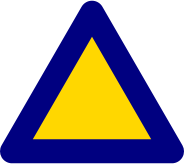
How an outline is stroked, given by its paint, its line width, and its cap and join styles.
How an outline is stroked, given by its paint, its line width, and its cap and join styles.
import smile.colors.PresetColor.*

val thick    = StrokeStyle(Navy, 12, StrokeStyle.Cap.Round, StrokeStyle.Join.Round)
val outlined = Triangle(80, fillWith(Gold), Some(thick))
Value parameters
- cap
-
The cap style of the stroke. Defaults to Square.
- join
-
The join style of the stroke. Defaults to Miter. A text's glyphs are stroked with round joins regardless. A stroke lives in its shape's own frame and scales with the shape, by each axis's own factor.
- paint
-
The single color or gradient used for the stroke.
- width
-
The width of the stroke, finite and not negative. Defaults to 1.
Attributes
- Throws
-
IllegalArgumentException
if the width is negative or not finite
- Companion
- object
- Source
- style.scala
- Supertypes
Parses and loads SVG pictures, each centered at the origin.
Parses and loads SVG pictures, each centered at the origin.
Attributes
- Companion
- class
- Source
- Element.scala
- Supertypes
- Self type
-
SvgPicture.type
A static SVG document, kept as vectors and drawn under an affine at the output's own density.
A static SVG document, kept as vectors and drawn under an affine at the output's own density.
Its local frame is the document's own, from the origin to its width and height, and its bounds are that box under its affine, whatever the document paints inside it. Its anchor starts in the middle of the document.
Moves, scalings, turns and flips keep it a vector picture, since each only changes its affine. Only what needs its pixels turns it into pixels, such as toBitmap, which renders it at the settings' scale. The document is opaque to recoloring. Its paints are not rewritten, so a smile.pictures.Recolor whose function changes a color the document shows gives a bitmap of the recolored pixels alone.
SVG pictures are equal when they have the same document, the same affine and the same anchor, so two pictures parsed from the same text separately are not equal.
In the browser, a document is decoded after it is parsed. The browser starts when the picture is made, and until it is done, canvas output draws nothing in the picture's place, and no rendering that left it out is kept. So a bitmap of a picture that holds it, made with Bitmap.of(picture), is transparent there and rendered again at every read and draw until then, and shows the picture afterwards. Pixels taken at once keep what they showed. Those are the pixels of toBitmap, which renders when it is called, and of a color operation such as transformARGB. Await the picture's ready first, or load it with smile.pictures.SvgPicture.load, which gives a picture that is ready. SVG output needs no decoding.
smile.pictures.SvgPicture$ parses and loads them.
Attributes
- Companion
- object
- Source
- Element.scala
- Supertypes
Lines of text.
Lines of text.
import smile.colors.PresetColor.*
import smile.modeling.*

val title = Text(Pos.Origin, None, "SMILe", "sans-serif", 48, 700, fillWith(Navy), None)

A text is an element like any other, and every transform of smile.pictures.Element applies to its letters.
Attributes
- Source
- Shapes.scala
- Supertypes
- Self type
-
Text.type
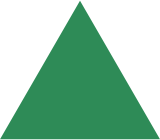
Equilateral, isosceles and scalene triangles, with the apex up.
Equilateral, isosceles and scalene triangles, with the apex up.
Every side has to have a length, and the sides have to satisfy the triangle inequality. A factory given sides that cannot make a triangle refuses with an IllegalArgumentException.
import smile.colors.PresetColor.*

val triangle = Triangle(80, fillWith(SeaGreen), None)
Attributes
- Source
- Shapes.scala
- Supertypes
- Self type
-
Triangle.type
The internal form of a wrap shift, which is child moved by dx and dy around period, a rectangle in the wrap's own frame, so that what leaves one edge comes back at the opposite one.
The internal form of a wrap shift, which is child moved by dx and dy around period, a rectangle in the wrap's own frame, so that what leaves one edge comes back at the opposite one.
The period is the child's bounds when the wrap is made, and the offsets are kept within the period's size, at least 0 and less than it. The wrap's bounds are its period under its affine, and its anchor starts at the child's. It is drawn as copies of the child under a clip of the period. Where the period lies on whole device pixels, those are up to four moved copies of the child itself. Elsewhere, and always in SVG output, they are copies of one tile that the child is drawn into (see smile.infrastructure.DrawPlan).
wrapShift (see smile.pictures) makes wraps. A shift of a wrap that has only been moved adds to its offsets, which keeps one wrap.
Attributes
- Source
- Element.scala
- Supertypes
Extensions
This bitmap's pixels on a new canvas of the bitmap's size. Scala.js only.
This bitmap's pixels on a new canvas of the bitmap's size. Scala.js only.
Every call makes a new canvas with a copy of the pixels. Drawing on it leaves the bitmap unchanged, as an immutable Bitmap requires. A canvas premultiplies its pixels by their alpha, so the colors of translucent pixels read back from it may come back slightly changed.
Value parameters
- settings
-
The settings the bitmap's pixels are computed with. See smile.pictures.Bitmap.pixels.
Attributes
- Source
- JSBitmapConversions.scala
This bitmap's pixels as a new TYPE_INT_ARGB BufferedImage of the bitmap's size. JVM only.
This bitmap's pixels as a new TYPE_INT_ARGB BufferedImage of the bitmap's size. JVM only.
The image is a copy. Drawing into it leaves the bitmap unchanged, as an immutable Bitmap requires. It copies the packed ARGB values, because drawing the bitmap would drop the color of fully transparent pixels. A BufferedImage is also a java.awt.Image.
Value parameters
- settings
-
The settings the bitmap's pixels are computed with. See smile.pictures.Bitmap.pixels.
Attributes
- Source
- JVMBitmapConversions.scala
This bitmap as a Swing ImageIcon the size of the bitmap, painting a copy of its pixels. JVM only. See smile.pictures.toAWTImage.
This bitmap as a Swing ImageIcon the size of the bitmap, painting a copy of its pixels. JVM only. See smile.pictures.toAWTImage.
Attributes
- Source
- JVMBitmapConversions.scala
This element with content added in front of it, moved so that the point of its bounds that positionType names is at (x, y). That point is the middle of its bounds by default, or their upper left corner.
This element with content added in front of it, moved so that the point of its bounds that positionType names is at (x, y). That point is the middle of its bounds by default, or their upper left corner.
Attributes
- Source
- Composition.scala
This element with content added on targetSide, gap pixels away and aligned along that side by align, in front of this element.
This element with content added on targetSide, gap pixels away and aligned along that side by align, in front of this element.
import smile.colors.PresetColor.*
import smile.modeling.*

val square = Rectangle(60, fillWith(Teal), None)
val pair   = square.addToRight(Circle(Pos.Origin, 20, fillWith(Gold), None), gap = 10)

Attributes
- Source
- Composition.scala
This element with content behind it.
This element with content added below it, gap pixels away and aligned by align.
This element with content added below it, gap pixels away and aligned by align.
Attributes
- Source
- Composition.scala
This element with content in front of it.
This element with content in front of it.
import smile.colors.PresetColor.*
import smile.modeling.*

val disc   = Circle(Pos.Origin, 40, fillWith(Crimson), None)
val target = disc.addToFront(Circle(Pos.Origin, 20, fillWith(White), None))

Attributes
- Source
- Composition.scala
This element with content added to its left, gap pixels away and aligned by align.
This element with content added to its left, gap pixels away and aligned by align.
Attributes
- Source
- Composition.scala
This element with content added to its right, gap pixels away and aligned by align.
This element with content added to its right, gap pixels away and aligned by align.
Attributes
- Source
- Composition.scala
This element with content added above it, gap pixels away and aligned by align.
This element with content added above it, gap pixels away and aligned by align.
Attributes
- Source
- Composition.scala
alternateWith downwards.
alternateWith rightwards.
This element with numberOfAlternations elements added on side, one after another, each next to all before it. First come the alternatives in order, then this element, then the alternatives again, and so on.
This element with numberOfAlternations elements added on side, one after another, each next to all before it. First come the alternatives in order, then this element, then the alternatives again, and so on.
import smile.colors.PresetColor.*
import smile.modeling.*

val red   = Circle(Pos.Origin, 12, fillWith(Crimson), None)
val blue  = Circle(Pos.Origin, 12, fillWith(Navy), None)
val beads = red.alternateRightwardsWith(Seq(blue), 6, gap = 4)

Attributes
- Throws
-
IllegalArgumentException
if the number of alternations is negative
- Source
- Composition.scala
content placed onto this element as addAt adds it, and the result cropped to this element's bounds as crop crops it, so nothing reaches outside this background.
content placed onto this element as addAt adds it, and the result cropped to this element's bounds as crop crops it, so nothing reaches outside this background.
Placing the empty picture gives this element unchanged, and placing anything onto the empty picture gives the empty picture, since its lack of bounds clips everything away.
Successive placements share one crop when the intervening transform preserves the axes. Placing once per animation tick then keeps the crop depth constant.
A background turned by an angle that is not a quarter turn has bounds that are the box around the turned rectangle, and a place crops to that box. Turning the result again takes the box around that box, so a fold that places and then turns grows without bound. For a square background turned by a, the side grows by abs(cos a) + abs(sin a) per step, about 1.08 at 5 degrees. To avoid it, crop back to a fixed window after each step.
Attributes
- Source
- Composition.scala
replicateTo downwards.
replicateTo rightwards.
This element with numberOfReplicas copies added on side, one after another, each next to all before it. Each copy is transformer applied to the copy before it, the first to this element.
This element with numberOfReplicas copies added on side, one after another, each next to all before it. Each copy is transformer applied to the copy before it, the first to this element.
import smile.colors.PresetColor.*
import smile.modeling.*

val dot = Circle(Pos.Origin, 20, fillWith(SteelBlue), None)
val row = dot.replicateRightwards(4, gap = 8)

Attributes
- Throws
-
IllegalArgumentException
if the number of replicas is negative
- Source
- Composition.scala
What this element draws within the world rectangle world, with world as its bounds even where nothing is drawn, and its anchor in the middle of world.
What this element draws within the world rectangle world, with world as its bounds even where nothing is drawn, and its anchor in the middle of world.
The rectangle stays a rectangle however this element is turned, and later transforms turn it with the content. A rectangle with no width or no height gives blank space of that size. A crop is always a clip, even of a rectangle that is exactly this element's bounds, so its anchor is always the middle of the rectangle.
When an earlier crop has only moved, scaled, turned by quarter turns or been mirrored, both crops share one clip. A crop on every tick, as a zoom makes, then stays one clip deep.
A crop of a turned element, or a turn of a crop, is cropped to the box around the turned rectangle, which is larger than the rectangle for an angle that is not a quarter turn. A square's side grows by abs(cos a) + abs(sin a) per turn by a. Crop back to a fixed window after each step of a fold to keep its bounds from growing.
import smile.colors.PresetColor.*
import smile.modeling.*

val star = Star5(40, 16, Pos.Origin, fillWith(Gold), None)
val half = star.crop(Bounds(Pos(-40, -40), Pos(0, 40)))

Attributes
- Throws
-
IllegalArgumentException
if a corner of
worldis not finite - Source
- Clipping.scala
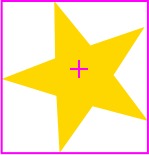
This element with guides for debugging. Its bounds are outlined and its anchor is marked by a small cross, both in magenta and in front of it. The result is anchored where this element is.
This element with guides for debugging. Its bounds are outlined and its anchor is marked by a small cross, both in magenta and in front of it. The result is anchored where this element is.
import smile.colors.PresetColor.*
import smile.modeling.*

val guided = Star5(40, 16, Pos.Origin, fillWith(Gold), None).rotateBy(20).withGuides
Attributes
- Source
- Clipping.scala
This element moved by dx to the right and dy down within its bounds, so that what leaves one edge comes back at the opposite one. The bounds and the anchor stay where they are, and a shift by the whole width or height gives this element back.
This element moved by dx to the right and dy down within its bounds, so that what leaves one edge comes back at the opposite one. The bounds and the anchor stay where they are, and a shift by the whole width or height gives this element back.
Shifting a shifted element that has only been moved, turned by quarter turns or mirrored since, adds to its shift. So does shifting a crop of a shift, where both have only been moved since and the crop is the shift's own rectangle. Either way, any number of shifts costs the same as one. After other transforms, a shift wraps the transformed element within its new bounds. Those bounds are the box around a turned element, so shifting and then turning by an angle that is not a quarter turn grows a square's side by abs(cos a) + abs(sin a) per step, as place does.
import smile.colors.PresetColor.*
import smile.modeling.*

val shape   = Star5(40, 16, Pos.Origin, fillWith(Gold), None)
val wrapped = shape.wrapShift(40, 0)

Attributes
- Throws
-
IllegalArgumentException
if an offset is not finite
- Source
- Clipping.scala
This element's pixels, frozen into a bitmap. They are rendered at once with settings at scale buffer pixels per logical pixel, as smile.infrastructure.Renderer.createBitmapFrom renders them. The bitmap covers the whole pixels the element's bounds touch, and its anchor is where the element's anchor is.
This element's pixels, frozen into a bitmap. They are rendered at once with settings at scale buffer pixels per logical pixel, as smile.infrastructure.Renderer.createBitmapFrom renders them. The bitmap covers the whole pixels the element's bounds touch, and its anchor is where the element's anchor is.
Pixel reads stay at one buffer pixel per logical pixel by default. A larger scale is for display on a dense screen, and its bitmap's buffer is that much denser than its bounds. A bitmap of pixels that only its own operations have placed is frozen already, and at the default scale it is its own bitmap. A bitmap of a picture is rendered with settings.
Something that covers no whole pixel, such as the empty picture or blank space with no width, gives a bitmap with no bounds whose pixels are one transparent pixel, since neither a Java image nor a canvas's pixel data can have none.
Attributes
- Throws
-
IllegalArgumentException
if
scaleis not positive and finite, or is not 1 for aStepwiserendering - Source
- Rasters.scala
This picture, once its document is decoded for canvas drawing, which starts when the document is parsed. Canvas output draws nothing in its place before that, so await this before reading its pixels. Scala.js only. Every picture of the same document shares the decoding, and SVG output needs none. It fails with an IOException if the browser cannot decode the document.
This picture, once its document is decoded for canvas drawing, which starts when the document is parsed. Canvas output draws nothing in its place before that, so await this before reading its pixels. Scala.js only. Every picture of the same document shares the decoding, and SVG output needs none. It fails with an IOException if the browser cannot decode the document.
Attributes
- Source
- SvgPictureJS.scala